Showing posts with label Test Automation Basics. Show all posts

How to create your first Test with TestComplete 8

This article explains how to use testcomplete to record your actions over the application you required to test and replay the reordered actions as your expectation.

Steps:

1. Create New Project Suite by providing project suite name and location.


2. Create new project under above project suite by specifying the name, location and other attribute of a new project and press next button.


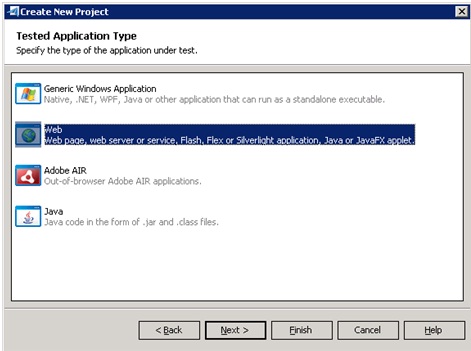
3. From this wizard window you allow to specify the type of the application under test. (For this example I opt for web application type).


4. Press Next to move for selecting testing methodology.


5. Now, this wizard window allows you to select the type of your web tests and web application.


6. Test complete allows you to add the tested web pages to your test project if you based on below scripting approach.


7. Now specify scripting language in this wizard window and press Finish button.


8. Now Click “Record New Test” button in order to record test. After this point, every action you perform is being recorded by Testcomplete. E.g. application launch, Every button click, etc.

9. After Recording, you can see all the recorded steps in Test complete workspace – keyword test panel as below “Google search” recording example.


Moreover, now you can notice each action you performed the corresponding screenshot in visualize panel as below.


10. Now, automated test has been created, and you allow running the test by clicking on "Run test" Button.

Now test complete going to drive the system and performed the same sequence of actions that you recorded.

After execution test complete will display test results in test log as follows. This result contains detail information about every action performed during the cause of the run.


To learn quick recording method view below video,


Decide What Test Cases to Automate

It is impossible to automate all test scenarios or test cases in given application testing scope, so it is important to determine what test cases should be automated in order to reduce manual testing effort, cost and improve application quality.

 
The benefit of automated testing is related to how many times a given test can be repeated. Test scenarios that are only executed a few times are better left for manual testing. Good test cases for automation are ones that are run frequently and require large amounts of data to perform the same action.

 
We can get the most benefit out of our automated testing efforts by automating:

 
  • Repetitive tests that run for multiple builds.
  • Tests that require multiple data sets. E.g. All Data Driven Test scenarios
  • Tests that run on several different hardware or software platforms and configurations. E.g. Browser compatibility
  • Frequently used functionality that introduces high risk conditions.
  • Tests that is impossible to perform manually. 
  • Tests that tend to cause human error. 
  • Tests that take a lot of effort and time when manual testing.
Success in test automation requires careful planning and design robust framework for given test scope. Therefore, automation team needs to create an automation plan for given project by analyzing application scope and determining all functional test areas that need to be automated with project qa team members.

First, we should define our project testing goal for automated testing and determine which types of tests to automate. Currently we are employing nuemorous types of testing in navantis test practice , and each has its place in the our organization process.

For instance,

 Unit Testing : Is use to test a small part of the intended application.
 Load Testing : Is performe when we need to know how a web service responds under a heavy workload.
 GUI Testing: Is use to test a certain piece of the application’s UI

Hope the above points will help you make a decision whether to use test automation on future Navantis projects. Whether you are beginning to think of exploring test automation or already have an automation suite in place and are considering expansion, it always helps to continue to evaluate how our test automation will help accomplish our testing goals. By choosing carefully those things that we will automate, and building with maintainability in mind, definitly we will obtain the most out of our test automation effort in our future projects.

Manual testing Vs Test automation

First it is very important to notice that Manual testing is not just random clicks on the user interface of a software application. For efficient testing of the software product you should have test plan and strongly defined test cases. Manual testing is the process of executing trough these test cases manually.

Test automation is a software code that is executing the same test cases or test scenarios but automatically using some kind of test automation tools or frameworks.
The development time of test automation can take a lot of time. Usually is a huge investment of time and resources. Some software companies prefer to use offshore outsourcing companies for doing their test automation, which cuts the costs.
It is common believe that once the test automation is created it is working forever. That is completely wrong. You can expect some expenses for fixing the test automation. But at the end test automation is much faster than the manual testing and is the only way you can do a fast regression testing. Test automation is recommended especially for very big software products.
My personal advice on whether you should use manual testing or test automation for your project is: Always have a small set of the most important tests automated, so when a bug fix is introduced at late stage of the project you will be able to run very quickly the most important test and after the bug fix is applied you will be able to do a full test pass.